> ## Documentation Index
> Fetch the complete documentation index at: https://docs.vendexlabs.com/llms.txt
> Use this file to discover all available pages before exploring further.
# Assessments
> The assessment lifecycle, approval statuses, evidence, and the audit log.
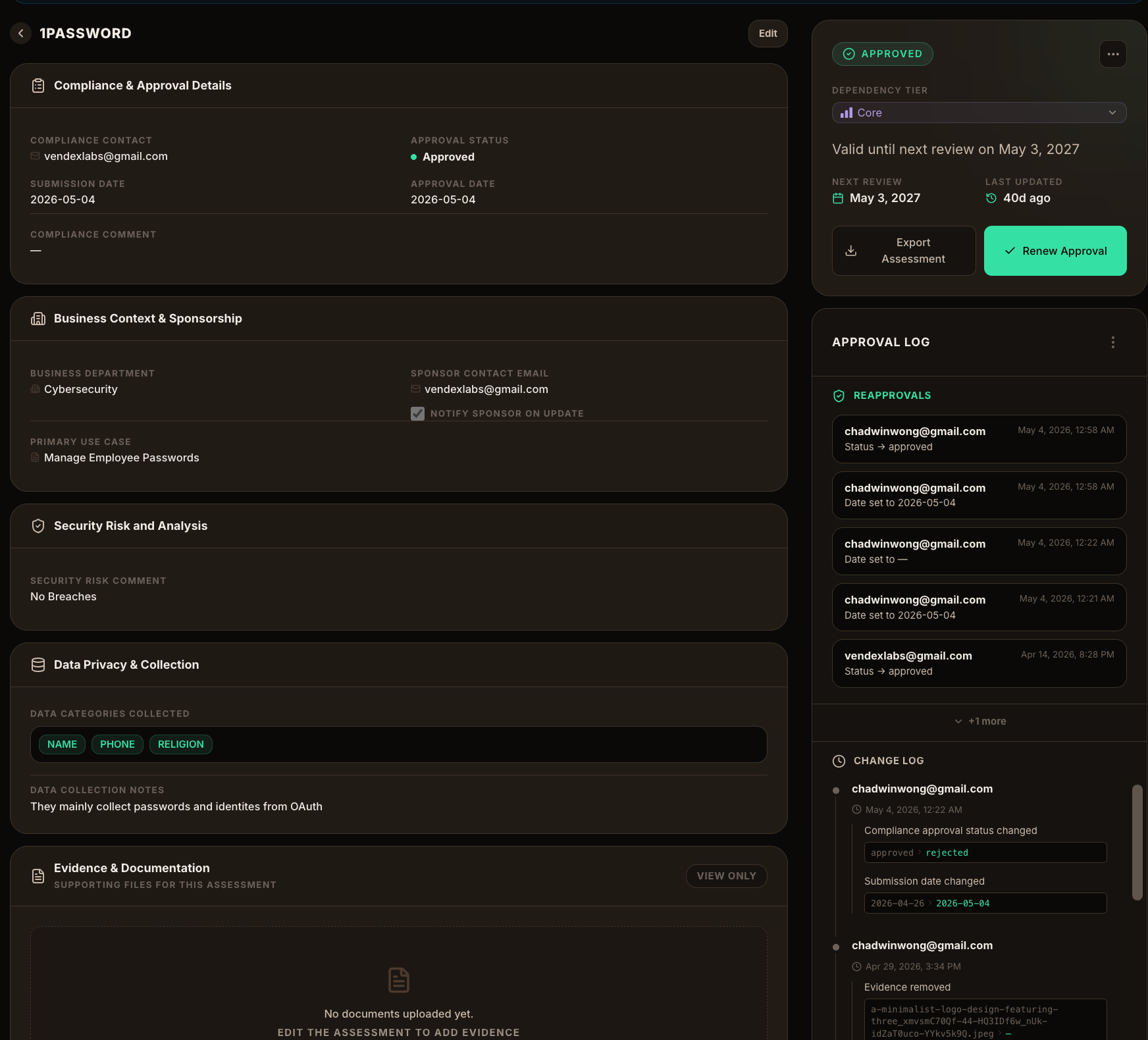
An **assessment** is your organization's record of reviewing a vendor. Where the [risk score](/concepts/risk-scoring) is VendexLabs' research-backed view, the assessment is *your* decision — the business context, the data the vendor handles, your compliance notes, supporting evidence, and an approval status. Every change is logged.
 ## What an assessment captures
The approval status, compliance contact, submission and approval dates, and free-text compliance notes. For conditional approvals, the specific condition that must be met.
The sponsoring department, the internal sponsor's contact, whether to notify the sponsor on updates, and the primary use case for the vendor.
Notes on the vendor's security posture as it applies to your usage.
The categories of data the vendor collects (e.g. name, phone), plus notes on how that data is handled.
Supporting files — questionnaires, reports, certifications — attached to the assessment.
## Approval statuses
An assessment moves through a clear lifecycle. The status is visible everywhere the vendor appears — the vendor grid, the assessments inbox, and the dashboard.
| Status | Meaning |
| ------------------------ | --------------------------------------------- |
| **Not Started** | No review has begun. |
| **In Progress** | Review is underway. |
| **On Hold** | Paused, waiting on information or a decision. |
| **Conditional Approval** | Approved, subject to a stated condition. |
| **Approved** | Cleared for use. |
| **Rejected** | Not approved for use. |
## What an assessment captures
The approval status, compliance contact, submission and approval dates, and free-text compliance notes. For conditional approvals, the specific condition that must be met.
The sponsoring department, the internal sponsor's contact, whether to notify the sponsor on updates, and the primary use case for the vendor.
Notes on the vendor's security posture as it applies to your usage.
The categories of data the vendor collects (e.g. name, phone), plus notes on how that data is handled.
Supporting files — questionnaires, reports, certifications — attached to the assessment.
## Approval statuses
An assessment moves through a clear lifecycle. The status is visible everywhere the vendor appears — the vendor grid, the assessments inbox, and the dashboard.
| Status | Meaning |
| ------------------------ | --------------------------------------------- |
| **Not Started** | No review has begun. |
| **In Progress** | Review is underway. |
| **On Hold** | Paused, waiting on information or a decision. |
| **Conditional Approval** | Approved, subject to a stated condition. |
| **Approved** | Cleared for use. |
| **Rejected** | Not approved for use. |
 ## The audit log
Every save on an assessment records who changed what and when. Related field changes from a single save are grouped into one event, so the **approval log** reads as a clear history of decisions — reapprovals, status changes, date changes, and evidence added or removed. This is what makes an assessment defensible in an audit.
Approvals are point-in-time. Assessments carry a review date, and VendexLabs surfaces upcoming expirations so approvals don't silently go stale. Renewing an approval is a first-class action on the vendor's assessment.
## Assessments and monitoring work together
An approval reflects what you knew at review time. If a vendor is later involved in a breach or vulnerability, [Recent Events](/guides/recent-events) surfaces it so you can re-open the assessment and reconsider — turning a static approval into continuous oversight.
Step-by-step: record a decision and attach evidence.
## The audit log
Every save on an assessment records who changed what and when. Related field changes from a single save are grouped into one event, so the **approval log** reads as a clear history of decisions — reapprovals, status changes, date changes, and evidence added or removed. This is what makes an assessment defensible in an audit.
Approvals are point-in-time. Assessments carry a review date, and VendexLabs surfaces upcoming expirations so approvals don't silently go stale. Renewing an approval is a first-class action on the vendor's assessment.
## Assessments and monitoring work together
An approval reflects what you knew at review time. If a vendor is later involved in a breach or vulnerability, [Recent Events](/guides/recent-events) surfaces it so you can re-open the assessment and reconsider — turning a static approval into continuous oversight.
Step-by-step: record a decision and attach evidence.